Is That Microsoft Security Warning on Your Screen Real?
A popup claiming your computer is infected and asking you to call a phone number is almost certainly a scam. Here is what it is, and what to do.
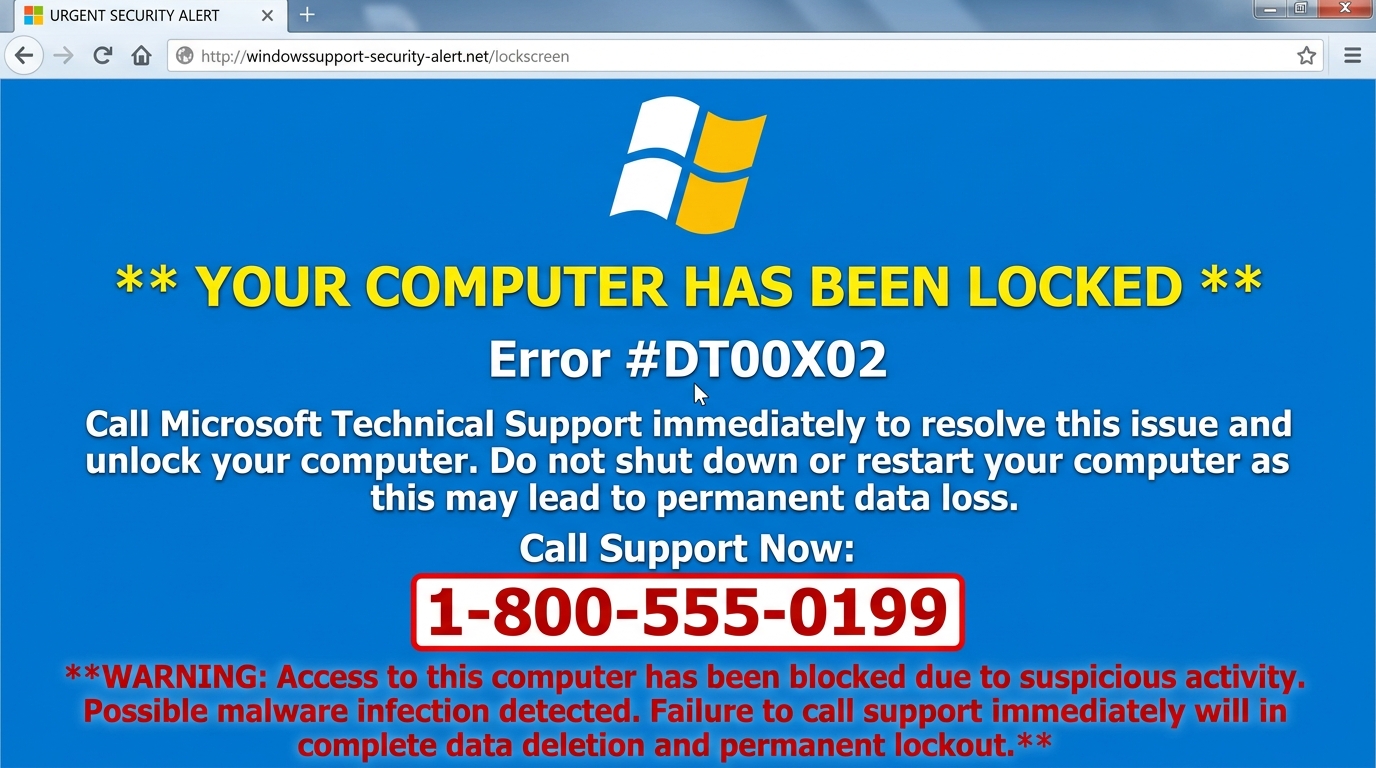
You are browsing the internet when a large alert fills your screen. It says your computer has been infected, your personal information is at risk, and you must call a phone number immediately. A recorded voice may be playing. The screen may appear frozen.
This is almost always a scam. It is called a fake tech support alert, and it is designed to make you call a number where someone will try to convince you to pay for unnecessary help — or gain remote access to your device.
Microsoft, Apple, and legitimate security software do not display alerts with phone numbers telling you to call them. Real security alerts appear inside the software itself — never in a webpage that locks your browser.
How to tell if it is a scam
A genuine security warning from Windows or your antivirus software appears inside the software — in the notification tray, within the antivirus program, or as a Windows Security notification. It never displays a phone number. It never plays an audio alarm through the browser. It never locks your screen and demands immediate action.
If the alert appeared in your web browser, showed a phone number, played a loud audio alert, or claimed your computer is blocked — it is a scam.
What these scams are trying to do
The goal is to get you on the phone. Once you call, someone will claim to be from Microsoft, Apple, or a security company. They will ask to connect to your computer remotely using tools like AnyDesk or TeamViewer. If they get access, they can install software, view your files, or steal information. They will also typically charge hundreds of dollars for services you do not need.
Common variations
These scams appear in many forms. Some use Microsoft's name and logo. Others claim to be from Apple, Norton, McAfee, or a government agency. Some say your IP address was used for illegal activity. Some claim your bank account has been compromised. The format changes, but the goal is always the same: get you to call a number or give someone access to your computer.
Recommended Immediate Steps
- Do not call the number displayed on the screen.
- Close the browser tab using the X on the tab, or press Alt + F4 (Windows) / Cmd + Q (Mac) to close the browser window entirely.
If these steps do not close the window, or if you are unsure whether anything was downloaded — contact our team below rather than trying risky actions on your own.
When to Request Second-Opinion Triage
If you cannot close the browser, if you already called the number, or if someone connected to your computer remotely — contact our team. Do not attempt further steps on your own. We can assess what happened and advise on next steps safely.
Have questions about what you have seen on your screen?
If you need a second opinion on an alert or want help putting proper zero-trust protection in place, our team is available to assist.